VMG, VMC, XTE, TAE: a few explanations

Acronyms are used to concisely specify navigation data. This language was originally developed for marine electronic instruments, GPS units and chart plotters. It is now found in digital navigation applications.
These acronyms, in the form of three capital letters, are the initials of English terms defining navigation-specific data and related functions. They make it easy to display information on screens while taking up very little space. Among them, some can be confusing.
VMG, VMC
VMG (Velocity Made Good) is, for a sailboat, the speed through the water at the best angle of upwind sailing. It is the “useful” speed through the water. It is calculated as:
VMG = STW x cos(TWA – LWY)
Where:
STW = Speed Through Water TWA = True Wind Angle LWY = Leeway (drift due to wind)
Here we are in the water surface reference frame.
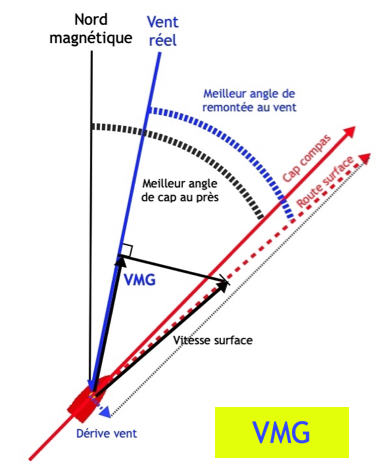
VMC (Velocity Made on Course) is the best approach speed over ground towards a waypoint or mark. It is the “useful” speed over ground. It is calculated as:
VMC = SOG x cos(BTW – COG)
Where:
SOG = Speed Over Ground BTW = Bearing To Waypoint COG = Course Over Ground
Here we are in the ground reference frame.
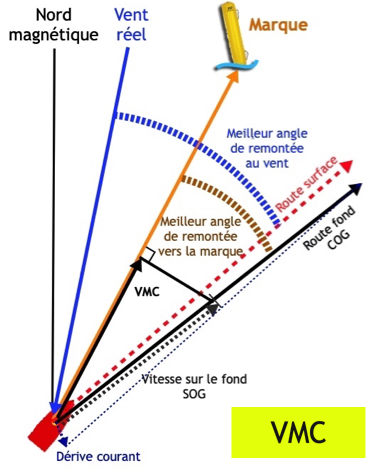
To simplify, we can say that:
- VMG focuses the helmsman’s attention during racing,
- VMC focuses the navigator’s attention during cruising,
- VMC largely depends on VMG.
XTE, TAE
XTE (Cross Track Error)
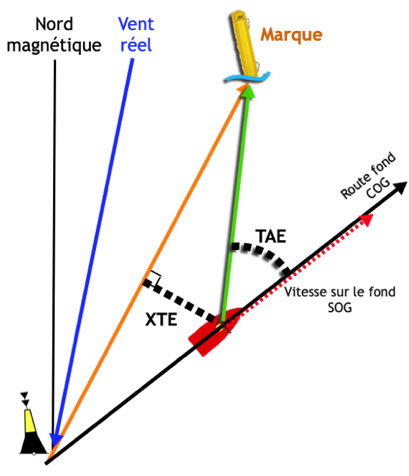
Cross Track Error (XTE) represents the distance by which the boat deviates from the route connecting the starting point (previous mark or waypoint) and the destination (mark to reach or active waypoint), measured perpendicularly to that route. This distance is expressed in metres or nautical miles, depending on the instrument.
TAE (Track Angle Error)
Track Angle Error (TAE) is measured between the bearing to the mark to reach (BRG) and the course over ground (COG). This very useful piece of data is unfortunately rarely found in applications.
Discover a wealth of tips and tricks on our site by browsing our FAQ and this Blog. Here, we regularly publish articles to help you get the most out of the application. You can also access the FAQ directly from the app interface by pressing the dedicated [?] button.